Tech Stack
Language / Framework
| Nuxt.js | SPA × SSR framework with TypeScript support and extensive plugin ecosystem |
| Vue.js | Component-based reactive UI framework with comprehensive tooling |
| TypeScript | Type-safe development with strong static typing and modern features |
UI / Styling
| Vuetify | Material Design component library with extensive component set |
| Sass/SCSS | CSS preprocessor with modular architecture and variable management |
State Management
| Vuex | Centralized state management with modular stores and type-safe patterns |
Others
| Axios | HTTP client with interceptors and comprehensive error handling |
| Vuelidate | Model-based validation framework with declarative validation rules |
| Jest | Unit and snapshot testing framework with Vue.js integration |
| Firebase | Authentication, database, and hosting services with real-time capabilities |
Architecture Overview
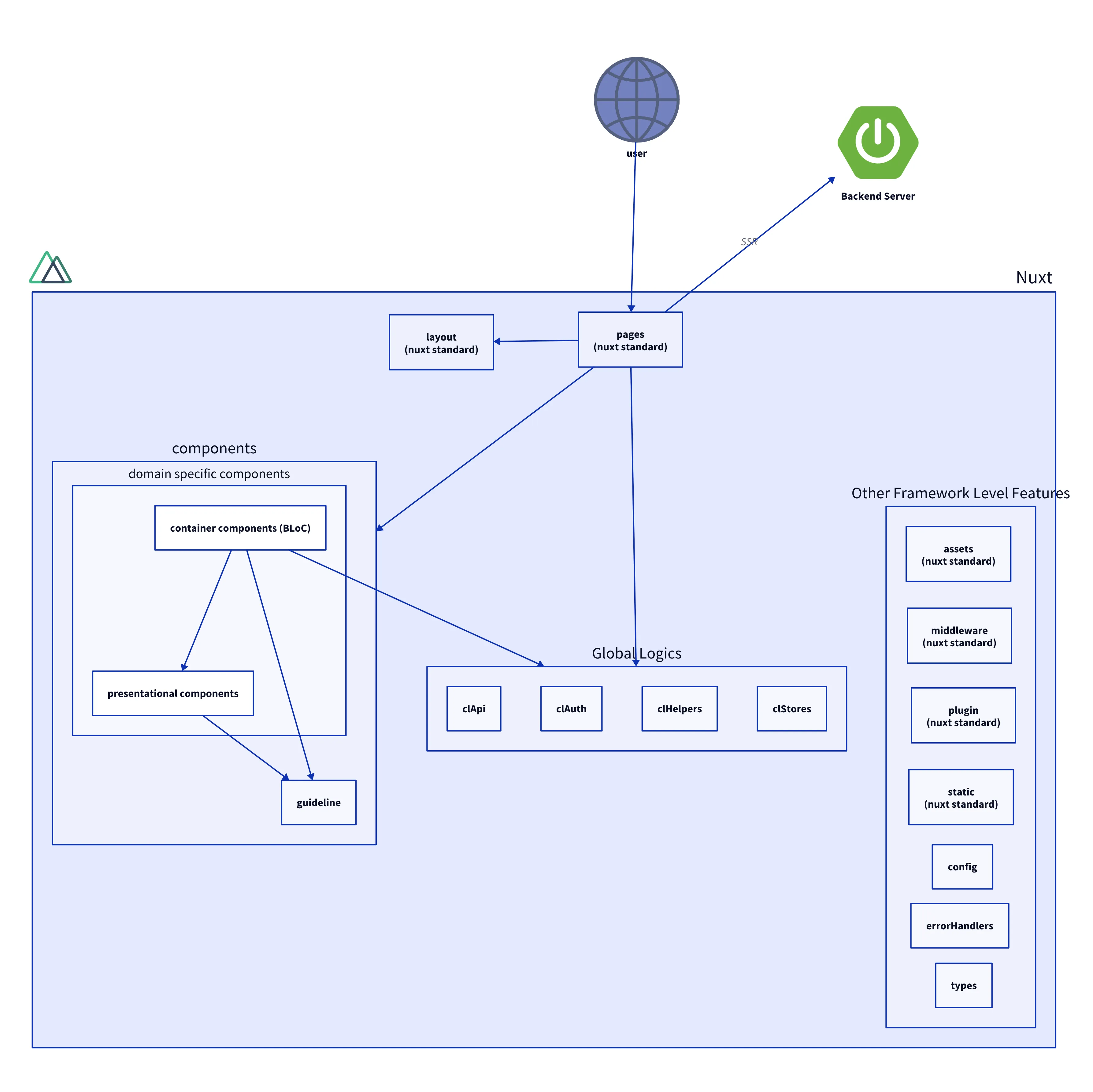
CrowdLinks frontend is built with a clear architectural structure that makes the application easy to scale and maintain. The platform supports three main actors — 1. individuals 2. corporations 3. administrators — each with their own specific features and access levels.
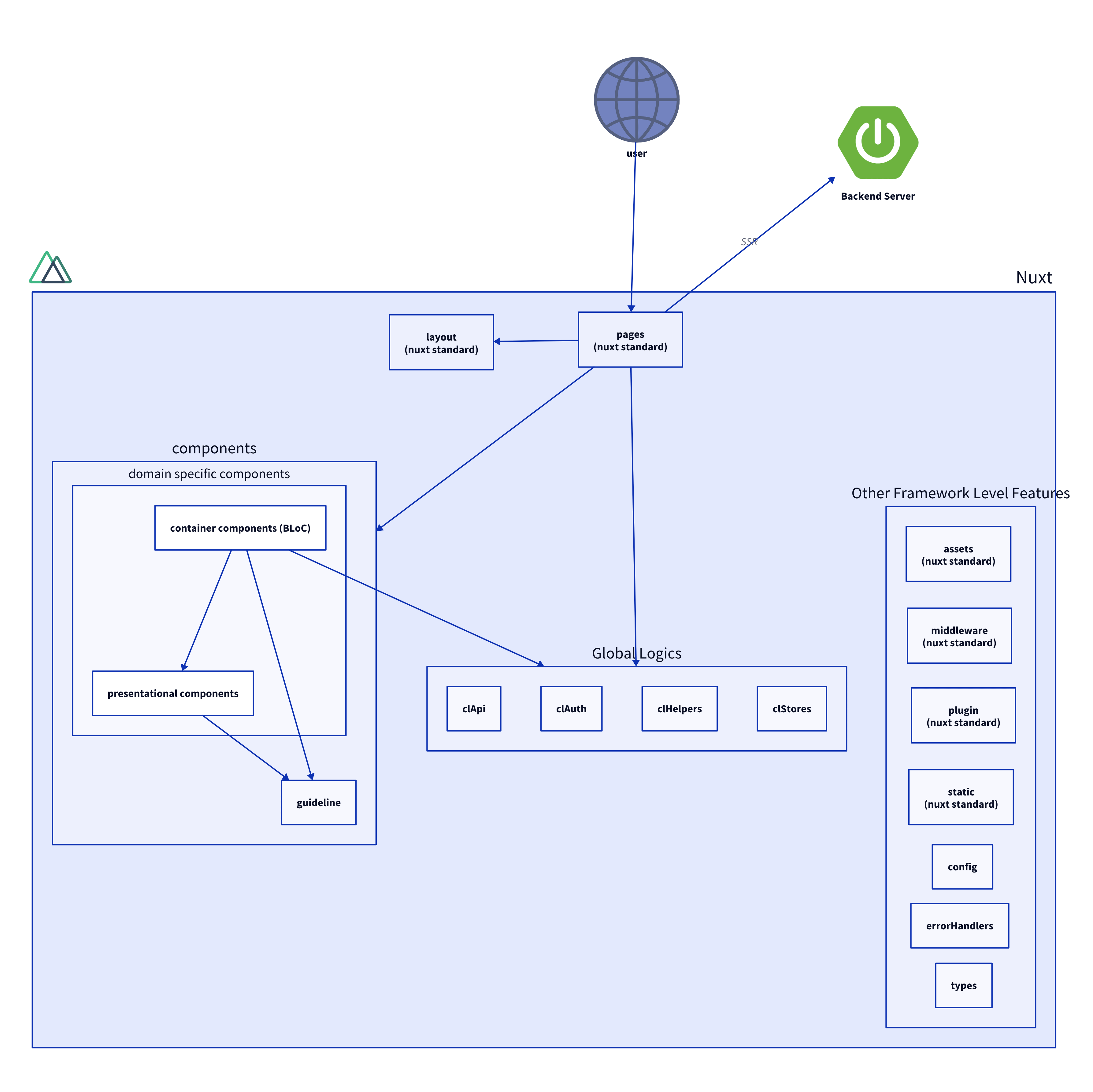
We built this applicatiton with Nuxt.js, Vue.js, and TypeScript, implementing a three-tier component design pattern with Container, Presentation, and Guideline components. This approach uses domain-based directory organization, type-safe API layer with role-based organization, Vuex state management with Nuxt’s inject feature for global properties, Firebase integration with multi-role authentication, role-based access control, custom error handling, and performance optimization strategies including lazy loading and code splitting.
Directory Structure
src/
├── apps/
│   ├── backendApis/          # API layer with role-based organization
│   ├── ui/                   # Frontend UI components and pages
│   └── helpers/              # Utility functions and cross-cutting concerns
├── config/                   # Configuration files and constants
├── plugins/                  # Nuxt.js plugins for global functionality
├── stores/                   # Vuex state management modules
└── types/                    # TypeScript type definitions
Core Technical Components
Modified Vue Component Design Pattern
We evolved our Vue component design pattern to address developer experience issues that emerged with the initial BLoC pattern mentioned in the prototype phase.
Previously, to separate responsibilities, we divided Container Components and Presentational Components into different directories, assigned layer hierarchy to each directory, and established rules where lower-layer components could not depend on higher-layer components (Container Component depends on Presentational Component, but not vice versa).
However, this approach resulted in a directory structure dependent on technical knowledge rather than domain knowledge, which made development difficult as closely related components were placed in distant directories.
# Before (Technical Structure)
src/apps/ui/components/
├── container/
│   ├── ProfileList.vue
│   ├── ProjectCard.vue
│   ├── ChatRoom.vue
│   └── ...
└── presentation/
    ├── ProfileList.vue
    ├── ProjectCard.vue
    ├── MessageList.vue
    └── ...
To address this issue, we reorganized directories based on domain knowledge, explicitly identified Container Components and Presentational Components within each domain directory by adding prefixes (e.g., CProfileList.vue, PProfileList.vue), and established rules to only allow dependencies in the direction C→P (C imports and uses P).
# After (Domain Structure)
src/apps/ui/components/
├── userProfile/
│   ├── CProfileList.vue      # Container component
│   ├── PProfileList.vue      # Presentation component
│   ├── CProfileEdit.vue
│   └── PProfileCard.vue
├── project/
│   ├── CProjectList.vue      # Container component
│   ├── PProjectCard.vue      # Presentation component
│   ├── CProjectForm.vue
│   └── PProjectFilter.vue
└── chat/
    ├── CChatRoom.vue        # Container component
    ├── PMessageList.vue     # Presentation component
    ├── CMessageInput.vue
    └── PMessageBubble.vue
Component Dependency Rules
Before:
- Container components could import from both container and presentation layers
- Presentation components could only import from presentation layer
- Cross-domain dependencies required navigating distant directory trees
After:
- Container components (C*) can import Presentation components (P*) within same domain
- Presentation components (P*) cannot import Container components
- Cross-domain imports follow explicit dependency injection patterns
- Related components stay within the same domain directory
- Both C* and P* components can import Guideline components
- Guideline components cannot import C* or P* components
Guideline Components
In addition to the Container (C*) and Presentation (P*) components, we introduced Guideline components to further enhance our component architecture:
- Purpose: Guideline components implement reusable UI patterns and design system elements that are shared across different domains
- Organization: They are organized in a dedicated
guidelinedirectory with subdirectories by category (button, form, modal, etc.) - Dependencies: Guideline components can be imported by both C* and P* components, but they cannot import C* or P* components
- Examples:
ConversionButton.vue,SimpleModal.vue,InputField.vue- components that enforce consistent styling and behavior across the application
This three-tier approach (C* → P*/Guideline) provides clear separation of concerns while maintaining flexibility for reusable design elements.
State Management with Vuex
Store Architecture
// Example: currentAuthenticationStatus store
interface CurrentAuthenticationStatusState {
  accountIdentifiers: AccountIdentifiers;
  accountMetadata: AccountMetadata;
  userRole: UserRole;
  idToken: string | null;
  isFinishedAuthProcess: boolean;
}

export const state = (): CurrentAuthenticationStatusState => ({
  accountIdentifiers: AccountIdentifiers.buildEmptyObject(),
  accountMetadata: AccountMetadata.buildEmptyObject(),
  userRole: UserRoleFactory.createUnkownUserRole(),
  idToken: null,
  isFinishedAuthProcess: false,
});
Typed Getters and Actions
Each store module provides typed getters and actions with clear naming conventions:
export const getters: GetterTree<
  CurrentAuthenticationStatusState,
  CurrentAuthenticationStatusState
> = {
  [IS_FINISHED_AUTH_PROCESS](
    rootState: CurrentAuthenticationStatusState
  ): boolean {
    return rootState.isFinishedAuthProcess;
  },
  [USER_ACCOUNT_IDENTIFIER_GETTER](
    rootState: CurrentAuthenticationStatusState
  ): UserAccountIdentifier | null {
    return rootState.accountIdentifiers.userAccountIdentifier;
  },
  // ... other getters
};
Nuxt’s Inject Feature for Type-Safe Global Properties
We were using Nuxt’s standard Store (Vuex) to handle global state. However, this simple approach had two main problems: “Store bloating” and “Lack of type checking (difficult to implement)”.
Therefore, we modified the implementation to use Nuxt’s inject feature to inject typed properties into the Vue instance, allowing reference and update of global state and execution of global processes from any Vue component.
This resolved the aforementioned issues with the standard Nuxt Store as follows:
- Bloating → Improved visibility by separating based on concerns
- Lack of type checking → Applied types normally using TypeScript
Properties Injected into Vue Instance
💡 clAuth Handles authentication processes and state management. (A custom implementation similar to Nuxt’s Store with type checking, focused on authentication)
// Usage in components
computed: {
    breadcrumbsText(): string {
      return this.$clAuth.userId ? "My Page" : "Top Page"
    },
💡 clStore Handles domain-specific processes and state management. (A custom implementation similar to Nuxt’s Store with type checking, focused on domain logic)
// Usage in components
computed: {
    defaultOffsetTop(): number {
      const path = this.$route.path
      return this.$clStores.scrollPosition.getters.getOffsetTop(path)
    },
  },
  watch: {
    "$clAuth.finishedAuthProcess": {
      handler() {
        if (this.$clAuth.loggedIn) {
          this.$clStores.favoriteProjectList.actions.refreshList()
        }
      },
      immediate: true,
    },
  },
💡 clHelper Handles application processes such as logging and thumbnail generation. (Makes utility functions globally accessible)
// Usage in components
computed: {
    headerImageUrl(): string {
      return this.project.headerImage
        ? this.$clHelpers.thumbnail.generateURL({
            image: this.project.headerImage,
            width: 250,
          })
        : ""
    },
API Layer Architecture
The application employs an API layer that provides type-safe communication with the backend while maintaining clear separation of concerns:
Base Classes
ReadRequest<T> and WriteRequest<T> abstract classes provide consistent interfaces.
import { ApiClient } from "~/apps/backendApis/foundation/ApiClient";

export abstract class ReadRequest<T> {
  protected readonly apiClient = new ApiClient<T>();

  abstract get(): Promise<any>;
}

// WriteRequest.ts
import { ApiClient } from "~/apps/backendApis/foundation/ApiClient";

export abstract class WriteRequest<T> {
  protected readonly apiClient = new ApiClient<T>();

  abstract post(): Promise<T>;
}ReadRequest.tsReadRequest.ts
ApiClient
Centralized HTTP client with Firebase authentication integration.
import axios, { AxiosResponse, AxiosInstance, AxiosError } from "axios";
import ApplicationApiError from "./ApplicationApiError";
import { auth } from "~/plugins/firebase";

export class ApiClient<T> {
  static readonly APPLICATION_CUSTOM_HEADER: object = {
    "Content-Type": "application/json",
  };

  private httpClient: AxiosInstance;

  constructor() {
    this.httpClient = axios.create({
      baseURL: process.env.BACKEND_API_BASE_URL + "/internal_frontend_web",
      timeout: 10000,
    });
  }

  public async get(path: string): Promise<T> {
    const headers = await this.makeRequestHeaders();
    const axiosResponse: AxiosResponse = await this.httpClient
      .get<T>(path, { headers })
      .catch((e: AxiosError) => {
        throw new ApplicationApiError(e);
      });
    return axiosResponse.data;
  }

  private async makeRequestHeaders() {
    const authUser: firebase.User | null = auth.currentUser;
    if (authUser === null) return {};

    const idToken = await authUser.getIdToken();
    return { Authorization: `Bearer ${idToken}` };
  }
}ApiClient.tsApiClient.ts
Role-based Organization
API endpoints organized by user roles (administrator, corporationMember, user, general).
export class GetUserAccountByIdReadRequest extends ReadRequest<UserAccountView> {
  constructor(private userId: string) {
    super();
  }

  async get(): Promise<UserAccountView> {
    return this.apiClient.get(
      `/administrator/user_account/read/${this.userId}`
    );
  }
}

// src/apps/backendApis/request/user/userProfile/read/GetCurrentUserProfileReadRequest.ts
export class GetCurrentUserProfileReadRequest extends ReadRequest<FullInfoUserProfileView> {
  async get(): Promise<FullInfoUserProfileView> {
    return this.apiClient.get(`/user/user_profile/read/current`);
  }
}/.../GetUserAccountByIdReadRequest.ts/backendApis/request/administrator/userAccount/read/GetUserAccountByIdReadRequest.ts
Error Handling
Custom ApplicationApiError class with status code detection.
// ApplicationApiError.ts
import { AxiosError } from "axios";

export default class ApplicationApiError extends Error {
  private readonly statusCode: number | undefined;

  constructor(error: AxiosError) {
    super(ApplicationApiError.makeMessage(error));
    this.statusCode = error.response?.status;
  }

  isNotFoundError(): boolean {
    return this.statusCode === 404;
  }

  isUnprocessableEntity(): boolean {
    return this.statusCode === 422;
  }

  private static makeMessage(error: AxiosError): string {
    return `status code : ${error.response?.status || "-"} , message : ${error.message}`;
  }
}
Role-Based Access Control
Building on the prototype’s approach, we implemented a role-based access control system that centralizes permission logic:
// Permission checking function
export const checkPermission = (
  store: any,
  requiredPermission: UniversalReadAcl
): boolean => {
  const userRole = store.getters[CURRENT_AUTHENTICATION_STATUS_USER_ROLE_GETTER]
  return hasPermission(userRole, requiredPermission)
}

// Usage in components
computed: {
  isAccessibleRequireAuthenticationResources(): boolean {
    return checkPermission(
      this.$store,
      UniversalReadAcl.REQUIRE_AUTHENTICATION_RESOURCES
    )
  }
}
Firebase Integration with Authentication
The application implements Firebase authentication with multi-role support:
// Firebase plugin configuration
import firebase from "firebase/compat/app";
import "firebase/compat/auth";
import "firebase/compat/firestore";

if (!firebase.apps || !firebase.apps.length) {
  firebase.initializeApp({
    apiKey: process.env.FIREBASE_API_KEY,
    authDomain: process.env.FIREBASE_AUTH_DOMAIN,
    // ... other config
  });
}

const db = firebase.firestore();
const auth = firebase.auth();
export { db, auth };
API Client with Token Management
The ApiClient class handles authentication with automatic token refresh:
export class ApiClient<T> {
  private async makeRequestHeaders() {
    const authUser: firebase.User | null = auth.currentUser;

    if (authUser === null) {
      return {};
    }

    const idToken = await authUser.getIdToken();
    const headers = {
      Authorization: `Bearer ${idToken}`,
    };
    return headers;
  }
}
Error Handling
The application implements error handling with custom error classes and status code detection:
export default class ApplicationApiError extends Error {
  private readonly statusCode: number | undefined;

  constructor(error: AxiosError) {
    super(ApplicationApiError.makeMessage(error));
    this.statusCode = error.response?.status;
  }

  isNotFoundError(): boolean {
    return this.statusCode === 404;
  }

  isUnprocessableEntity(): boolean {
    return this.statusCode === 422;
  }
}
Performance Optimization
Build Configuration
// nuxt.config.ts
build: {
  publicPath: "/assets/",
  extractCSS: !isDev,
  hardSource: isDev,
  terser: {
    parallel: isCircleci ? 2 : true,
  },
  babel: {
    plugins: [
      "@babel/plugin-proposal-nullish-coalescing-operator",
      "@babel/plugin-proposal-optional-chaining",
    ],
  },
}
Component Optimization
- Lazy Loading: Component lazy loading for improved initial load time
- Code Splitting: Automatic code splitting by route and component
- Asset Optimization: Responsive image handling with multiple resolution support