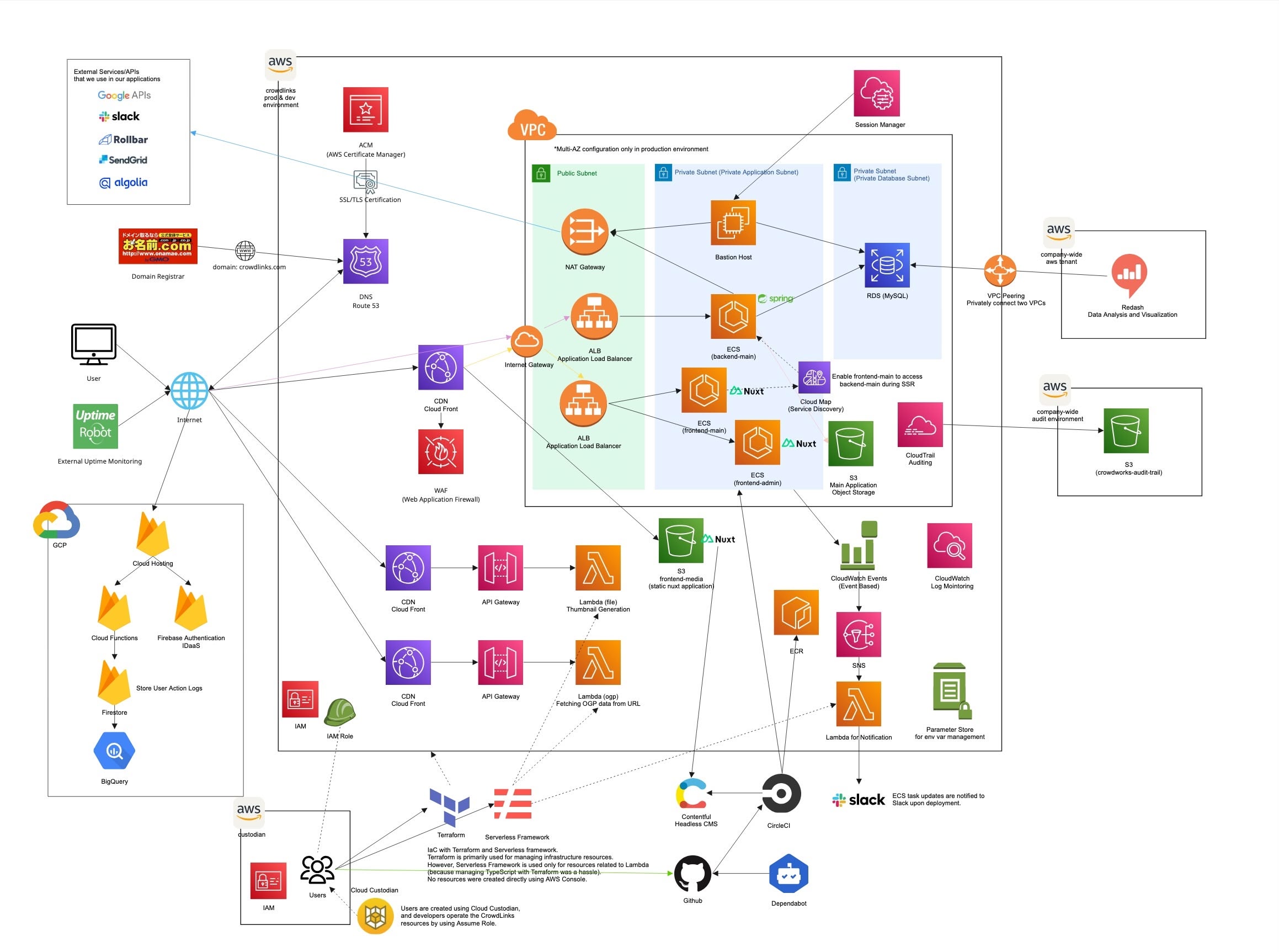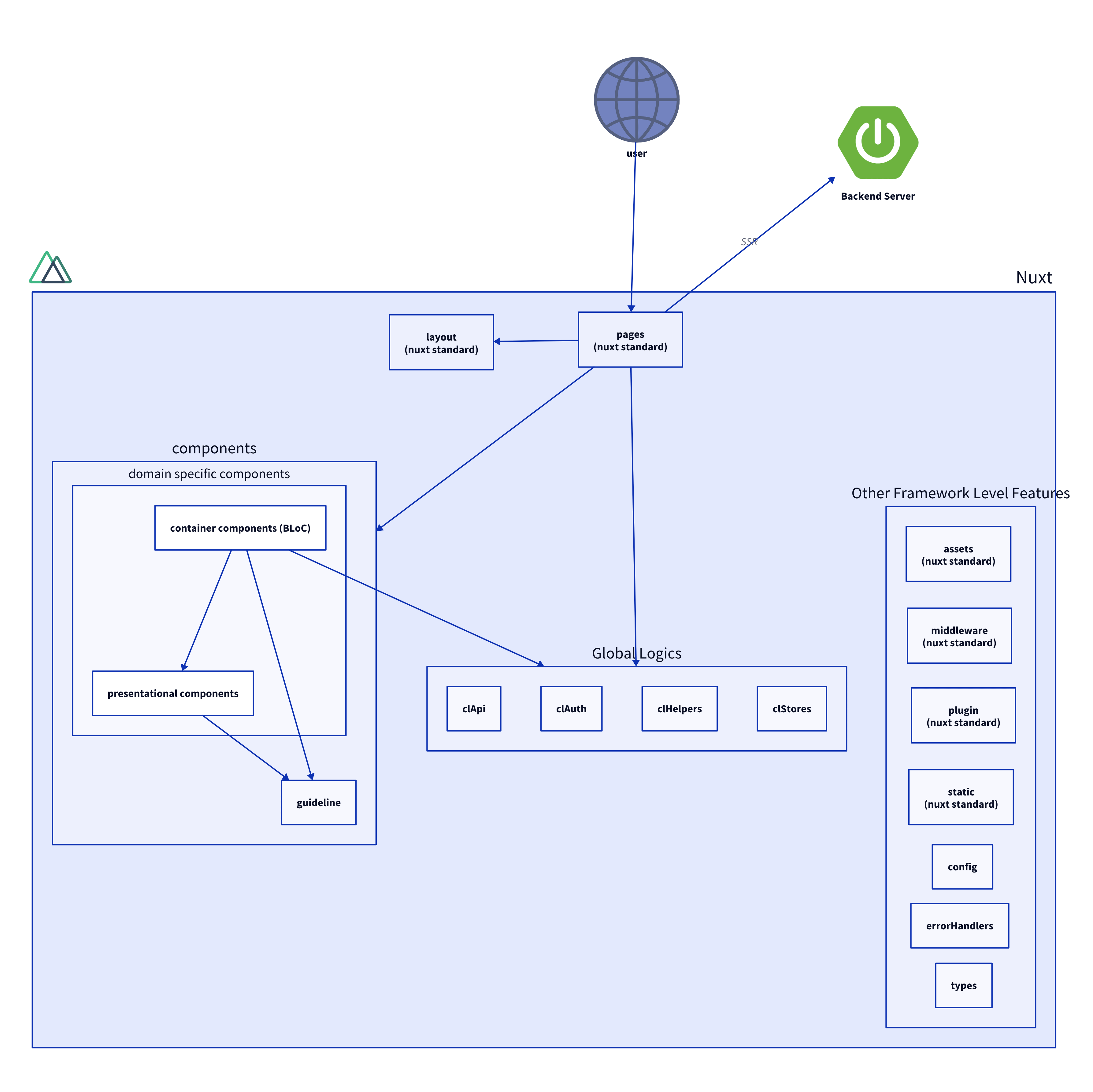

MVP First Phase
We built the MVP for the new business “CrowdLinks” using the following architecture and conducted PSF (Problem-Solution Fit) validation.
Some features were intentionally left unimplemented and operated manually to deliver the overall user experience—an example of a so-called “Wizard-of-Oz” style MVP.
| Technology | Category | Description |
|---|---|---|
| Nuxt.js | Frontend | SPA × SSR |
| TypeScript | Frontend | Enables safer development through a strong type system |
| Firebase Hosting | Infrastructure | Hosts Nuxt as an SPA |
| Firebase Functions (SSR) | Infrastructure | Executed via Firebase Hosting’s rewrite feature. Serves Nuxt on an Express server to enable SSR. |
| Firebase Functions (API) | Backend | Serverless functions for the API. Triggered by requests to designated Hosting paths via rewrite rules. |
| Firebase Auth | IDaaS | Provides user authentication for the application. |
| CircleCI | CI/CD | Automates build, test, and deployment workflows. |
| yarn | CI/CD | Package manager faster than npm |
| Atomic Design | Design Pattern | Used to design modular, reusable UI components. |
MVP Post Problem-Solution Fit Phase
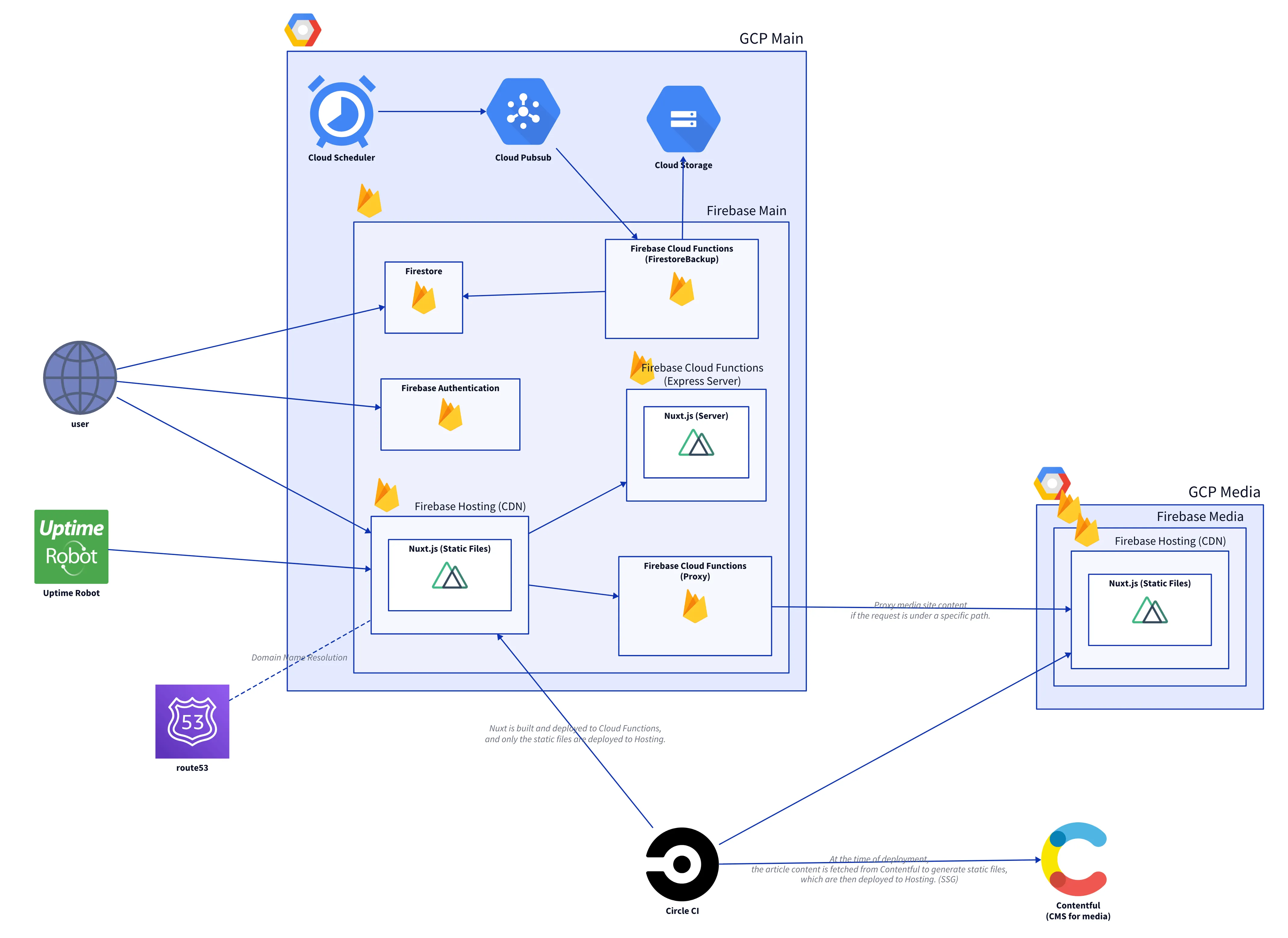
Tech Stack
Main Application
| Nuxt.js | Nuxt application for the main product |
| TypeScript | Enables safer development through a strong type system |
| Firebase Hosting | CDN used to deliver the main Nuxt application as an SPA |
| Firebase Functions (SSR) | Served via Hosting rewrite; distributes the main Nuxt app on an Express server for SSR |
| Firebase Functions (API) | Serverless functions for the API; triggered by requests routed through Hosting rewrite rules |
| Firebase Function (ProxyServer) | Requirement: deliver a different Firebase project under a subdirectory instead of a subdomain. Requests under /articles are proxied to the media Firebase project. |
| Firebase Auth | Provides user authentication for the application. |
| Presentational and Container Component Pattern | Component design pattern that separates responsibilities into “state” and “design” |
Media Application
| Nuxt.js | Nuxt application for media content. Generated as a static site. Separated from the main app at the domain level. |
| TypeScript | Enables safer development through a strong type system |
| Firebase Hosting | Hosts and serves the static media Nuxt application as a CDN |
| Contentful | Headless CMS for articles. Changes trigger a webhook → relevant deployment flows start in CircleCI. |
Build & Development Tools
| CircleCI | Because of monorepo architecture, deploy workflows detect changed directories and only run the necessary deployments. |
| yarn | Package manager faster than npm |
Core Technical Components / Decision Making
Monorepo
We chose a monorepo structure based on the team’s situation. The main goal was improving developer experience (DX) for better productivity.
Given our business status and a small team (only 3 engineers), it was inefficient for each person to separately handle frontend, backend, and infrastructure tasks. We needed everyone to cover all areas, but a multi-repo setup would require constant repository switching during development and reviews.
We judged that this cross-repo overhead was non-essential and wasteful. Thus, we adopted a monorepo to eliminate this switching cost.
Pros 👍
- Completely eliminates repo-switching tasks
- Simplifies dependency management between projects
- Improves code sharing and reusability across projects
- Easier to enforce consistent coding standards and tools
- Enables atomic commits across multiple applications
Cons 👎
- Onboarding Cost, Setup Cost: Requires solid understanding of CircleCI to optimize deployment flows; onboarding new members may incur learning costs
- Potential for longer build times if not properly optimized
Adding Media Application as a Microfrontend
We integrated a media-oriented Nuxt application within our monorepo as a microfrontend. This approach allowed us to:
| Topic | Benefit |
|---|---|
| Maintain unified codebase | While separating concerns between main application and media content |
| Choose subdirectory distribution | (/articles) over subdomain for better SEO and user experience |
| Isolate infrastructure | By deploying the media app to its own Firebase project while maintaining seamless integration |
| Enable independent scaling | Of media content without affecting core application performance |
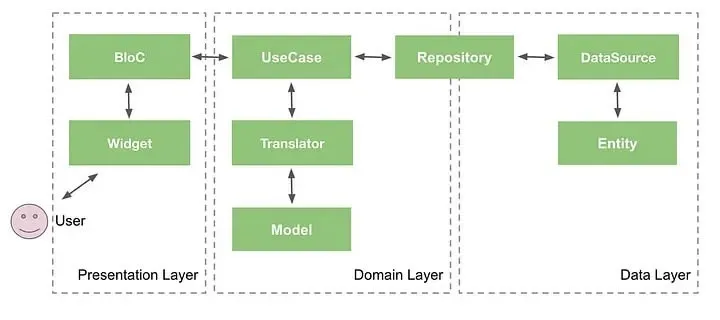
BLoC Pattern: Separating State and Presentation
After finding Atomic Design led to components with mixed responsibilities, we adopted the BLoC (Business Logic Component) pattern to create clearer separation of concerns:
- Presentation Components: Handle UI rendering and user interactions
- BLoC Components: Manage state, business logic, and data flow
This approach eliminated ambiguity in component responsibilities and improved maintainability.
RBAC Implementation for Permission Management
As user roles became clearer, we implemented Role-Based Access Control (RBAC) to simplify authorization logic and eliminate code duplication.
Approach: Tell, Don’t Ask
Before: Permission checks were scattered throughout components, with each fetching data and implementing logic (Ask pattern).
After: Centralized permission checking through a dedicated function (Tell, Don’t Ask pattern).
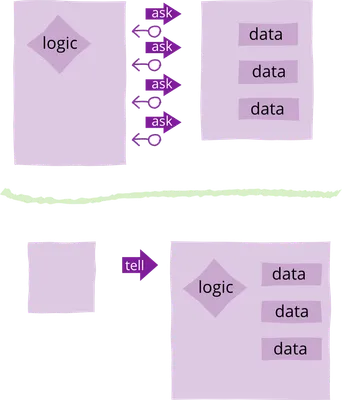
Example: Project Apply Button
Before - Logic embedded in component:
<button v-if="isAppliable" @click="apply">
    Apply for Project
</button>
</template>

<script lang="ts">
  computed: {
    currentUser(): CurrentUser | null {
      return this.$store.getters[CURRENT_USER_GETTER]
    },
    currentUserProfile(): UserProfile | null {
      return this.$store.getters[CURRENT_USER_PROFILE_GETTER]
    },
    isAppliable(): boolean {
      return (
        this.currentUser !== null &&
        this.currentUserProfile !== null &&
        this.currentUserProfile.hasEnoughProfile()
      )
    }
  }
</script>
After - Delegated to permission checker:
<button v-if="isAppliable" @click="apply">
    Apply for Project
</button>
</template>

<script lang="ts">
import { checkPermission } from "~/supports/auth/permissionChecker"
import { ParticularWriteAcl } from "~/config/acl/accessControlList"

  computed: {
    isAppliable(): boolean {
      return checkPermission(this.$store, ParticularWriteAcl.PROJECT_APPLY)
    }
  }
</script>
This abstraction centralizes permission logic, making it easier to maintain and modify access rules without touching component code.