
Overview
Pangolin is the secure, high-availability gateway for my Proxmox Homelab. Hosted on Oracle Cloud Infrastructure (OCI), it serves as the public entry point for my publically exposed self-hosted services.
Pangolin is more than just a reverse proxy; it is an Identity-Aware Tunneled Reverse Proxy. It acts as a central hub that connects my isolated homelab network—sitting behind a restrictive residential firewall—to the public internet through encrypted tunnels. This enables me to expose services securely without opening any ports on my home router or requiring a traditional VPN for every client.
Tech Stack
| Technology | Description |
|---|---|
| OCI | Oracle Cloud Infrastructure. Used as a public entry point for homelab services. |
| Pangolin | Identity-aware access control and tunnel management. |
| Traefik | The edge router handling SSL termination and traffic routing on CloudVM. |
| Caddy | Local reverse proxy for internal routing and service discovery. |
| CrowdSec | Collaborative Intrusion Prevention System (IPS) for threat detection. |
| Gerbil | WireGuard-based tunnel server. |
| Tailscale | Zero config VPN for secure private networking between devices. |
| GoAccess | Real-time web log analyzer. |
| Ubuntu Server | The base operating system for all Virtual Machines and LXC containers. |
| Terraform | Infrastructure as Code tool used to provision VMs and LXC containers. |
| Cloud-Init | Industry standard for early initialization of cloud instances (Ubuntu Server). |
| Docker | Platform for developing, shipping, and running applications in containers. |
| Cloudflare | DNS management for deployed services. |
Architecture
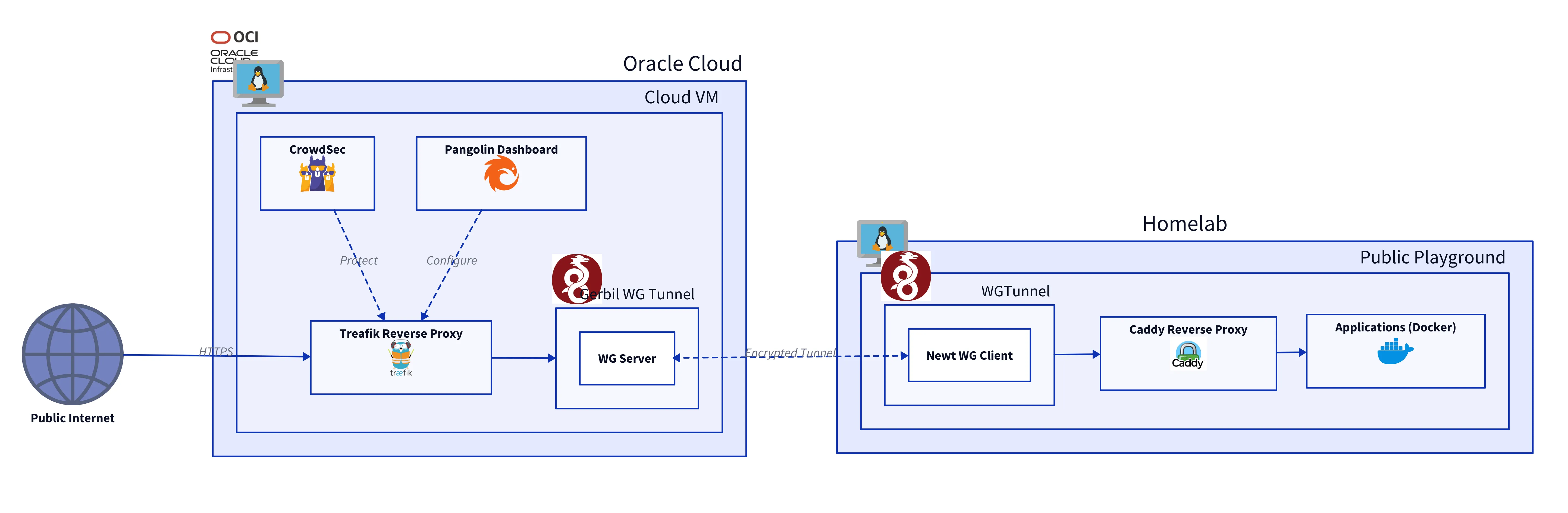
The system is built on a Secure Cloud Gateway architecture. It uses the OCI instance as a public entry point, connecting to my homelab via a secure WireGuard tunnel. This setup allows me to expose services without revealing my home IP address or opening any ports on my local router.
1. Cloud Gateway (OCI)
Infrastructure (IaC)
The underlying infrastructure is provisioned on OCI using Terraform. This setup includes a dedicated Virtual Cloud Network (VCN), a public Subnet, and an Internet Gateway to allow external traffic to reach the proxy.
I use an oci-instances.auto.tfvars file to configure the instance resources using a map-based approach, allowing for easy expansion.
# Networking Configuration
vcn_name    = "pangolin-vcn"
vcn_cidr    = "10.0.0.0/16"
subnet_cidr = "10.0.1.0/24"

# Define instances in a structured map
oci_instances = {
  "pangolin-gateway" = {
    shape            = "VM.Standard.A1.Flex"
    ocpus            = 1
    memory_in_gbs    = 4
    assign_public_ip = true
  }
}terraform/.../oci-instances.auto.tfvarsterraform/services/oci-gateway/oci-instances.auto.tfvars
The main.tf file defines the actual resources:
# 1. Virtual Cloud Network (VCN)
resource "oci_core_vcn" "main" {
  cidr_blocks  = [var.vcn_cidr]
  display_name = var.vcn_name
  dns_label    = "vcn"
}

# 2. Internet Gateway (for public access)
resource "oci_core_internet_gateway" "main" {
  vcn_id       = oci_core_vcn.main.id
  display_name = "${var.vcn_name}-gateway"
}

# 3. Public Subnet
resource "oci_core_subnet" "public" {
  cidr_block     = var.subnet_cidr
  vcn_id         = oci_core_vcn.main.id
  display_name   = "${var.vcn_name}-public-subnet"
}

# 4. Compute Instances (Iterate over map)
resource "oci_core_instance" "gateway_nodes" {
  for_each = var.oci_instances

  display_name = each.key
  shape        = each.value.shape

  shape_config {
    ocpus         = each.value.ocpus
    memory_in_gbs = each.value.memory_in_gbs
  }

  create_vnic_details {
    subnet_id        = oci_core_subnet.public.id
    assign_public_ip = each.value.assign_public_ip
    # ...
  }
}terraform/services/oci-gateway/main.tfterraform/services/oci-gateway/main.tf
Stack (Docker Compose)
The application stack is composed of several key components running in Docker:
- Pangolin (Control Plane): The central dashboard and management server. It handles identity-aware access control and manages the configuration for the proxy.
- Gerbil (Tunnel Server): A Wireguard-based tunneling server. It listens for connections from my homelab and establishes the secure data plane.
- Traefik: The edge router handling SSL termination (Let’s Encrypt) and traffic routing. It polls Pangolin for dynamic configuration.
- CrowdSec: A collaborative IPS (Intrusion Prevention System) that analyzes logs and blocks malicious IPs.
services:
  pangolin:
    image: docker.io/fosrl/pangolin:1.11.1
    # ... healthchecks and volumes ...

  gerbil:
    image: docker.io/fosrl/gerbil:1.2.2
    cap_add:
      - NET_ADMIN
    depends_on:
      pangolin:
        condition: service_healthy
    # ...

  traefik:
    image: docker.io/traefik:v3.5
    command:
      - --configFile=/etc/traefik/traefik_config.yml
    network_mode: service:gerbil # Routes traffic through the tunnel
    # ...docker-services/.../docker-compose.ymldocker-services/oci-reverse-proxy/pangolin/docker-compose.yml
2. Local Landing Zone (Public Playground)
The Public Playground Server is the designated VM in my homelab that receives traffic from the cloud. It is the only place where public traffic is allowed to enter the private network.
- Newt (Client Agent): Connects to Gerbil on OCI to establish the tunnel.
- Caddy (Local Proxy): Receives traffic from Newt and routes it to the specific internal service.
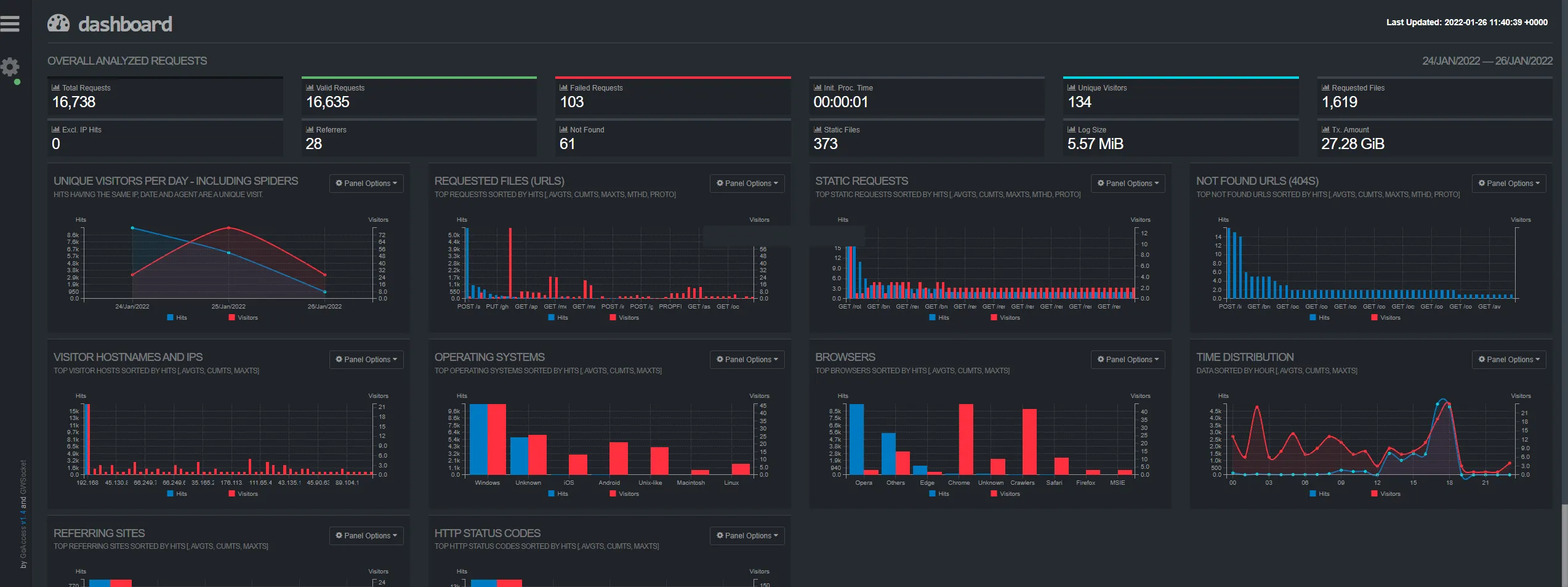
- GoAccess: Analyzes Caddy’s access logs to provide real-time traffic statistics and visualization.
- Yoroshiku: A lightweight health check service used to verify the entire chain is working.
GoAccess Dashboard
Stack (Docker Compose)
services:
  caddy:
    image: caddy:2-alpine
    # ... ports and volumes ...

  goaccess:
    image: allinurl/goaccess:latest
    command: /logs/access.log --log-format=CADDY --real-time-html ...
    volumes:
      - ./data/logs:/logs:ro
      - ./data/goaccess_report:/report:rw
    # ...docker-services/.../compose.ymldocker-services/pve-111-public-playground/caddy/compose.yml
This separation ensures that even if the Public Playground is compromised, the rest of the homelab remains isolated behind internal firewalls.
Key Features
1. Tunneled Access with Newt
The connection between the OCI Gateway and my Homelab is bridged by Newt, the client-side agent.
- Gerbil: Runs on OCI, listening for connections.
- Newt: Runs on the Public Playground Server in my homelab.
Newt establishes an outbound encrypted tunnel to Gerbil. This allows Pangolin to route public traffic down the tunnel to my private services, bypassing NAT and firewalls entirely.
Once traffic reaches the Public Playground Server, it is handled by Caddy, which acts as the local reverse proxy. Caddy terminates the tunnel traffic and routes requests to the appropriate internal Docker services (like Yoroshiku) or other VMs in the homelab. This tiered proxy architecture ensures that:
- Pangolin (Cloud) handles public ingress, SSL, and security filtering.
- Caddy (Local) handles internal routing and service discovery within the homelab.
2. Identity & Context Aware Access
Pangolin provides a centralized dashboard to manage access policies. I can define rules based on user identity (via OIDC/OAuth) and context, ensuring that sensitive internal tools are protected by a login screen even if they don’t have built-in authentication.
3. Security First with CrowdSec
Security is paramount for a public gateway. CrowdSec reads Traefik’s access logs in real-time and detects attacks (like brute force, port scans, or HTTP probing).
- Detection: If an IP is flagged, CrowdSec adds it to a blocklist.
- Prevention: A Traefik middleware (
crowdsec-bouncer-traefik-plugin) checks every request against this blocklist and drops malicious traffic at the edge.
experimental:
  plugins:
    crowdsec:
      moduleName: github.com/maxlerebourg/crowdsec-bouncer-traefik-plugin
      version: v1.4.4

entryPoints:
  websecure:
    http:
      middlewares:
        - crowdsec@file # Applied globally to all HTTPS trafficconfig/traefik/traefik_config.ymlconfig/traefik/traefik_config.yml