Tech Stack
Infrastructure / DevOps
| Technology | Category | Description |
|---|---|---|
| Terraform | IaC | Manages most AWS resources (VPC, ECS, RDS, etc.) with code. |
| Serverless Framework | IaC | Manages Lambda functions to simplify TypeScript handling. |
| AWS | Cloud Provider | Hosting platform using ECS Fargate, RDS, etc. |
| Docker | Containerization | Containerizes applications for consistent environments across dev and prod. |
| CircleCI | CI/CD | Automates Terraform plan/apply and application deployments. |
| Makefile | Task Runner | Abstracts complex Terraform commands for easier developer operation. |
Architecture Overview
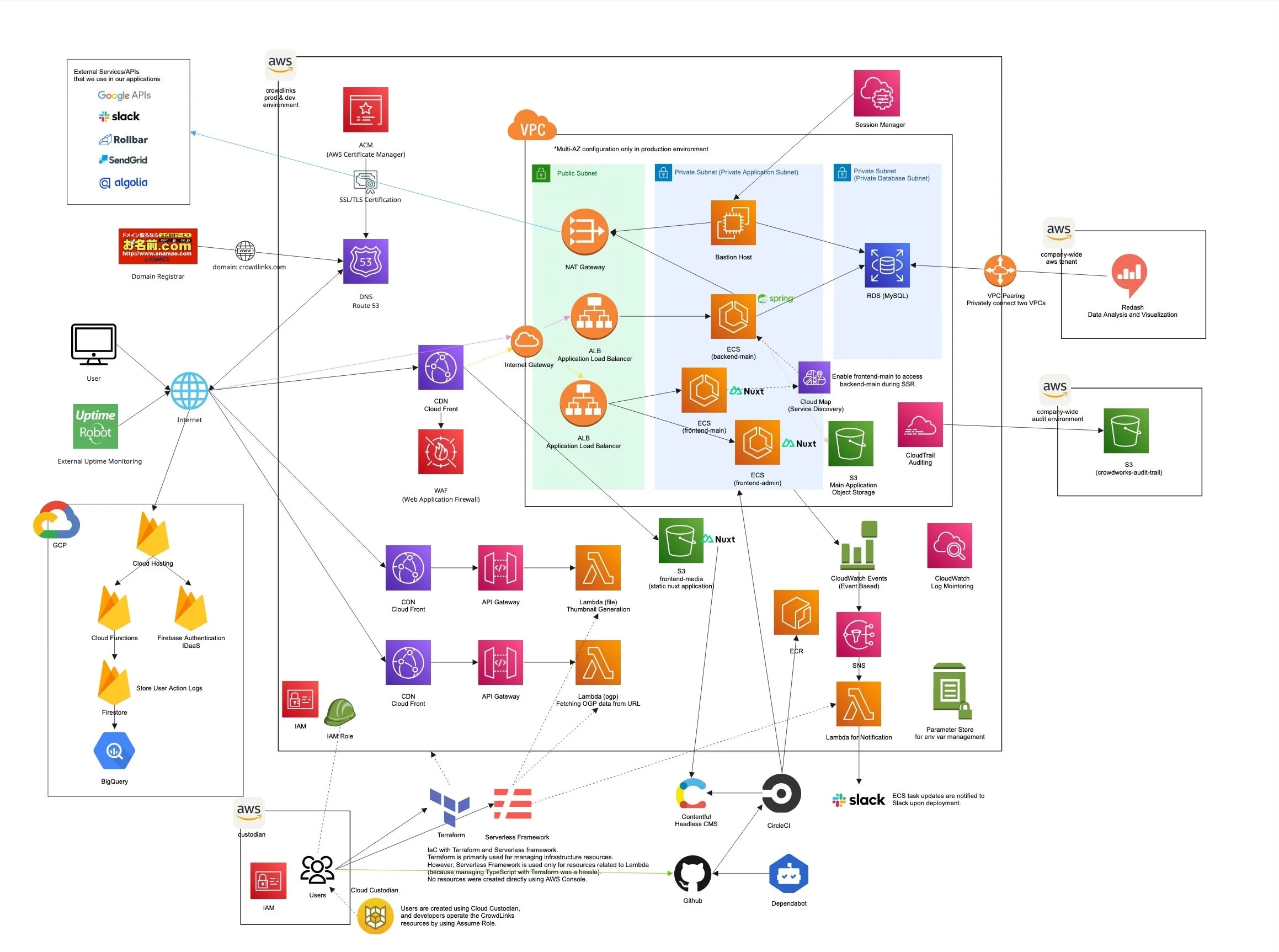
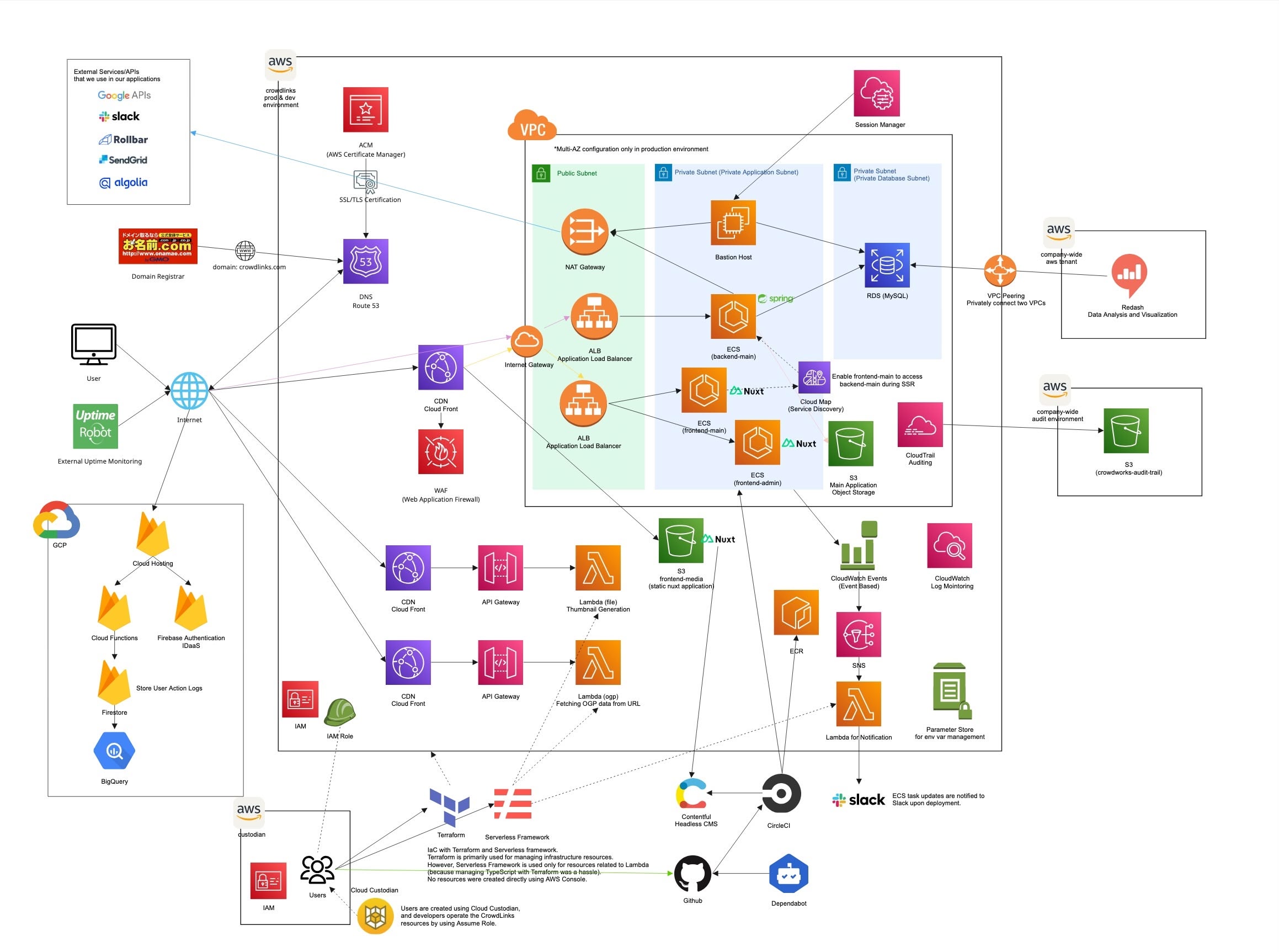
The infrastructure is designed for high availability and scalability, utilizing AWS managed services.
- Compute: ECS Fargate for running containerized applications (Web, API, Batch) and AWS Lambda for serverless functions.
- Database: Amazon RDS for MySQL for the primary relational database.
- Networking: VPC with public/private subnets, ALB for load balancing, and NAT Gateways for outbound access.
- Service Discovery: AWS Cloud Map for service registration and discovery, enabling frontend-main to access backend-main during Server-Side Rendering (SSR).
- Security: IAM roles for fine-grained permissions, Security Groups for network access control, and ACM for SSL/TLS certificates.
Infrastructure as Code (IaC) Strategy
We strictly enforce a “No Ops in Console” rule. All resources are managed via IaC tools to ensure reproducibility and prevent configuration drift.
- Terraform: Used for the majority of the infrastructure (Networking, Database, ECS, etc.).
- Serverless Framework: Used specifically for AWS Lambda functions to streamline TypeScript compilation and deployment.
Directory Structure: Environments vs Modules
To maximize code reusability and maintainability, we separated the codebase into modules and environments.
modules/: Contains reusable Terraform modules for specific resources (e.g.,vpc,rds,ecs_task). These modules are environment-agnostic.environments/: Defines the actual infrastructure for each environment (dev,prod) by calling the modules with specific configuration values.
infrastructure-aws/
├── environments/
│   ├── dev/
│   │   ├── main.tf
│   │   ├── variables.tf
│   │   └── ...
│   └── prod/
│       ├── main.tf
│       ├── variables.tf
│       └── ...
├── modules/
│   ├── vpc/
│   ├── rds/
│   ├── ecs_task/
│   └── ...
└── Makefile
This structure allows us to:
- Ensure consistency between Dev and Prod environments.
- Update shared logic in one place (the module) and propagate it to all environments.
Operational Abstraction with Makefile
Managing Terraform commands across multiple directories and environments can be complex and error-prone. To solve this, we implemented a Makefile to abstract these operations.
Key Benefits:
- Simplified Commands: Developers can run
make plan-dev-webinstead of navigating directories and remembering long Terraform commands. - Bulk Operations: Commands like
make plan-dev-allallow planning changes across all components in an environment at once. - Consistency: Ensures everyone runs Terraform with the same flags and configurations.
# Example from Makefile
plan-dev-web: ## terraform plan dev/web
	$(call terraform_init,${DEV_WEB_DIR})
	$(call terraform_plan,${DEV_WEB_DIR})
Monorepo Strategy
We adopted a Polyglot Monorepo strategy to manage the entire application lifecycle in a single repository. This includes:
crowdlinks/
├── backend-main       # Spring Boot (Kotlin)
├── frontend-main      # Nuxt.js (TypeScript)
├── frontend-admin     # Nuxt.js (TypeScript)
├── frontend-media     # Nuxt.js (TypeScript)
└── infrastructure-aws # Terraform & Serverless Framework
Benefits
- Unified Versioning: Atomic commits allow us to change API contracts and frontend consumption simultaneously.
- Eliminated Context Switching: Developers can work across the full stack without constantly switching repositories.
- Simplified Dependency Management: Shared logic and tools are easily accessible across the stack.
- Consistent Standards: Easier to enforce unified linting, formatting, and tooling across all projects.
- Streamlined Onboarding: New developers only need to clone one repository to get the full environment running.
Streamlined CI/CD Pipeline for monorepo
We utilize CircleCI with advanced configuration patterns to handle the complexity of a monorepo efficiently.
Dynamic Configuration & Selective Execution
To avoid unnecessary builds and reduce wait times, we implemented a Dynamic Configuration system.
- Change Detection: A custom script (
.circleci/bin/is_changed_directory.sh) analyzes git diffs to identify which top-level directories (e.g.,backend-main,infrastructure-aws) have changed. - Config Generation:
generate_circleci_config.shdynamically generates the CircleCI configuration file, including only the jobs relevant to the changed components. - Selective Execution: Only the necessary workflows run. For example, a change in
infrastructure-awswill trigger Terraform jobs but skip the Spring Boot build.
Workflows
The pipeline is divided into distinct workflows for each component:
backend-main: Builds Spring Boot app, generates jOOQ code, and deploys to ECS.frontend-main: Builds Nuxt.js app and deploys to ECS.frontend-admin: Builds Nuxt.js app and deploys to ECS.frontend-media: Builds Nuxt.js app (static) and deploys to S3.infrastructure-aws: Runsterraform planon PRs andterraform applyon merge.
Automated Notifications
We integrated Slack notifications to keep the team informed:
- Diff Detection: Notifies which directories have changed in the current push.
- Deployment Status: Alerts the team when a deployment to Staging or Production starts and finishes.
This automated, intelligent pipeline ensures that our “No Ops in Console” rule is strictly followed while maintaining high developer velocity.